Inventory
The Inventory section gives you a central view of everything related to your test management — test suite executions, test suites, tests, Flow Goal Suites, and Flow Goals.
Suite Executions
The Suite Executions table shows every execution that has been run, with key details at a glance:
- Suite name and ID
- Status — Done, In Progress, or Failed
- App URL and Browser used
- Start and End timestamps
- Result metrics — total tests, passed, and failed counts
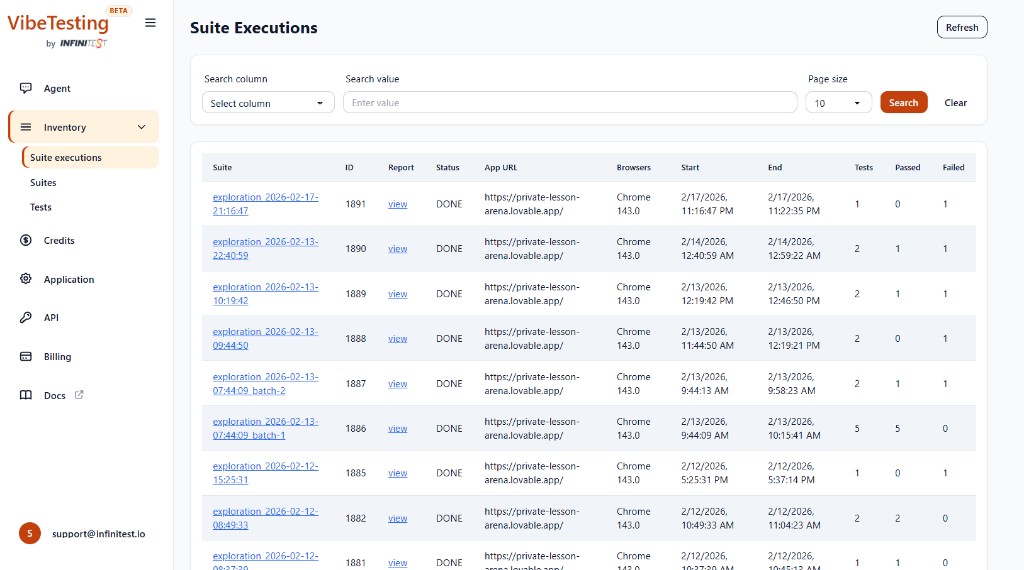
Use the search and filter controls to find specific executions by column value, and adjust the page size as needed.
Test Suites
A test suite is a named collection of tests. You can:
- View all your test suites and the tests they contain
- Trigger a suite to re-run directly from Inventory, VibeTesting skill, or via the External API
- Compare results across runs to track regressions
Tests
Individual tests appear in the Tests inventory. Each test record includes:
- Test name and type (Exploration or Guided). If a test has an unknown/legacy type, it may appear as
invalid_type. - The suite it belongs to
- Execution history and latest result
Flow Goal Suites
The Flow Goal Suites inventory lists reusable collections of saved Flow Goals. A suite can represent a smoke pack, release checklist, critical path set, onboarding validation, or another shared QA collection.
From this section, you can view Flow Goal Suites and run them by ID or name through Inventory, the External API, or the VibeTesting skill.
Flow Goals
The Flow Goals inventory lists saved, reusable natural-language objectives. Use it for repeatable checks such as onboarding, settings updates, checkout, and known regression paths.
Saved Flow Goals can be reused directly or grouped into Flow Goal Suites so the team has a maintained inventory of user-centric validations.
Re-running suites
You can re-run any existing suite at any time:
- From Inventory — open Test Suites or Flow Goal Suites and run the suite there
- From the chat — ask the agent to re-run a suite by name when supported
- From the API — call the Run Suite endpoint with the suite ID or name
- From the skill — run a saved Flow Goal Suite by ID or name from your coding-agent workflow
Re-runs help you validate fixes and catch regressions by executing the same tests after changes.