Exploration Mode (Running Tests)
Overview
Exploration is one of VibeTesting's two execution types (alongside Guided). In exploration, the agent explores your app autonomously based on your focus areas and General Instructions.
What exploration is best for
- Sanity checks before release
- Finding unexpected UI/flow issues
- Quickly understanding where users can get stuck
What you configure
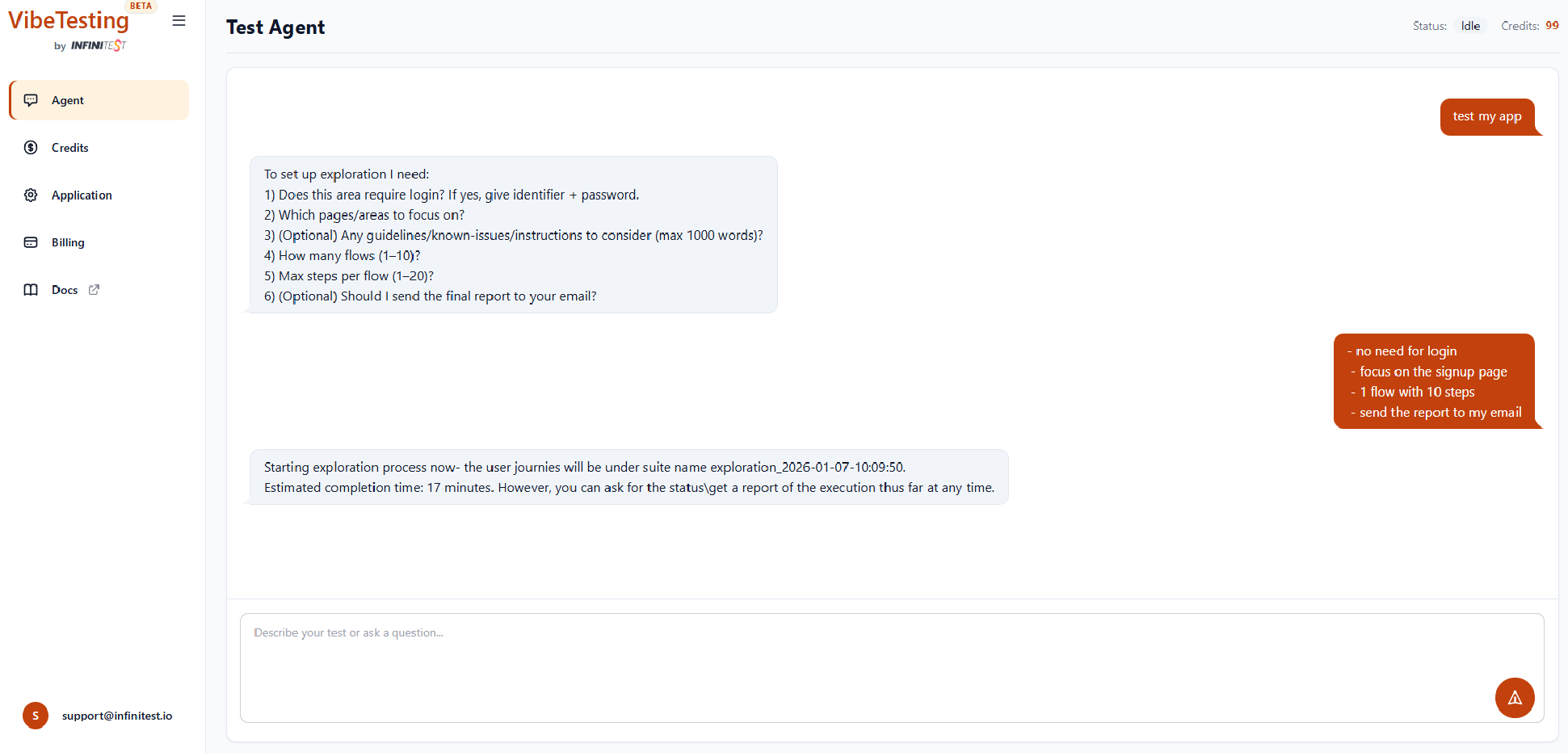
When you type "Test my app", the agent typically asks:
- Whether login is needed (credentials-based only)
- Which pages/areas to focus on
- Optional General Instructions — guidelines / known issues / constraints (up to about 1,000 words in one message; the server may shorten longer text)
- Number of flows
- Max steps per flow
- Optional: whether to email the final report
How exploration behaves
- The agent samples a variety of actions to increase coverage
- It respects your focus areas and guidelines
- It reports UI and flow issues with severity and context
Batched exploration
When using batched execution, exploration batches can cover different themes or focus areas, increasing coverage across your application in a single run.
Monitoring progress
Exploration runs in the cloud. You can monitor progress from the agent chat or via real-time logs while the run is executing.
Results and reports
- View results in the agent chat (progress + outcomes)
- Follow execution in real time via real-time logs
- If email reporting is enabled, you'll receive a full report that includes screenshots