Inventory
The Inventory section gives you a central view of everything related to your test management — suite executions, suites, and individual tests.
Suite Executions
The Suite Executions table shows every execution that has been run, with key details at a glance:
- Suite name and ID
- Status — Done, In Progress, or Failed
- App URL and Browser used
- Start and End timestamps
- Result metrics — total tests, passed, and failed counts
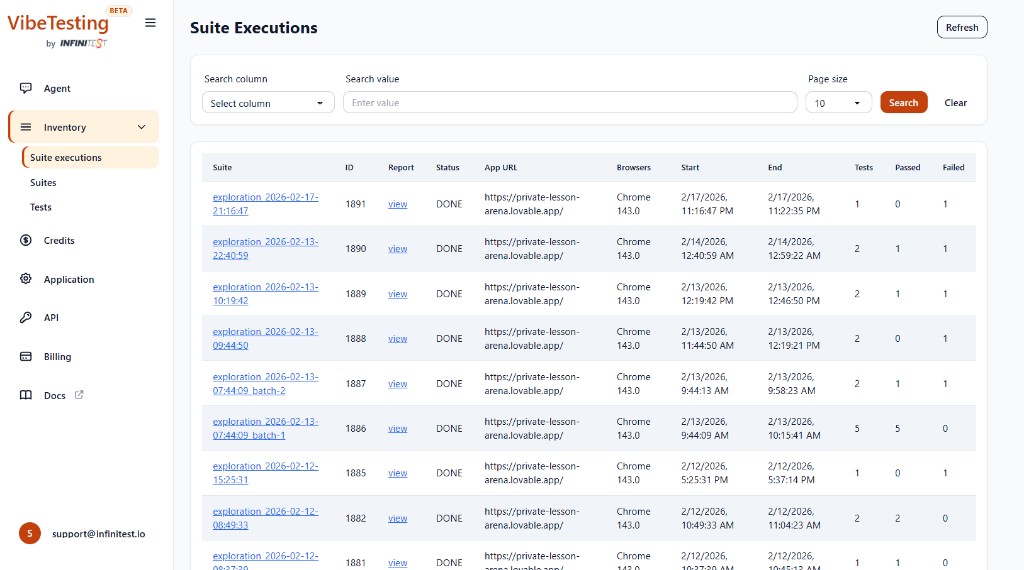
Use the search and filter controls to find specific executions by column value, and adjust the page size as needed.
Suites
A suite is a named collection of tests. You can:
- View all your suites and the tests they contain
- Trigger a suite to re-run directly from the agent chat or via the External API
- Compare results across runs to track regressions
Tests
Individual tests appear in the Tests inventory. Each test record includes:
- Test name and type (Exploration or Guided). If a test has an unknown/legacy type, it may appear as
invalid_type. - The suite it belongs to
- Execution history and latest result
Re-running suites
You can re-run any existing suite at any time:
- From the chat — ask the agent to re-run a suite by name
- From the API — call the Run Suite endpoint with the suite ID
Re-runs help you validate fixes and catch regressions by executing the same tests after changes.